
GroundGear One

Local AI.
No Cloud Required.

A self-contained privacy bridge for your files and ideas. Plug in one device and open a private workspace for redaction, encrypted storage, and intelligent notes.

  • RedactSafe file sharing
  • VaultEncrypted storage
  • NotesPrivate intelligence
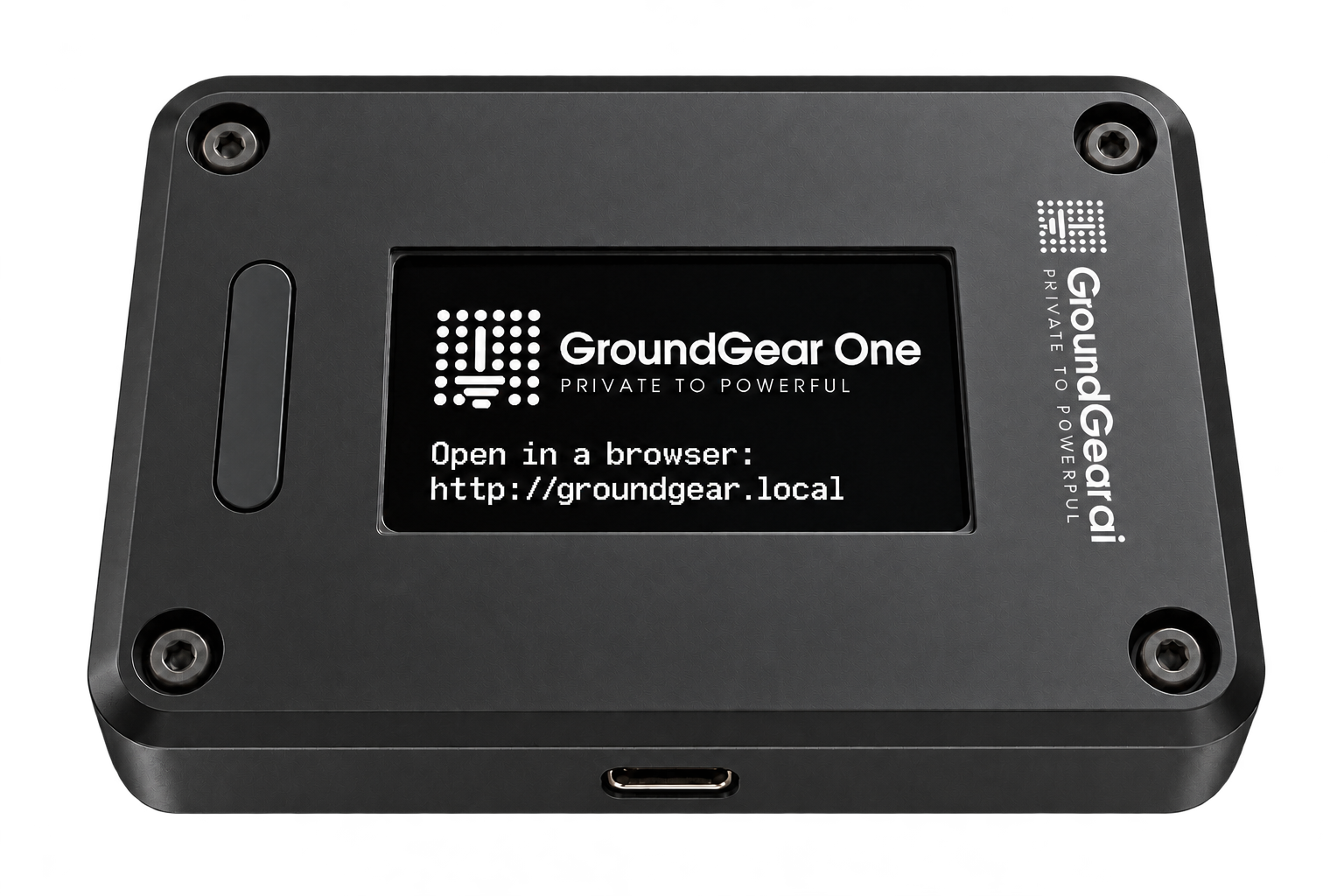
Idealized GroundGear One rebuilt from the source device: anodized black aluminum, four black screws, monochrome white GroundGear.ai enclosure printing, an unlit control button, end-mounted USB-C, and an OLED with the exact dot-lattice symbol, GroundGear One title, and groundgear.local browser prompt
57.2 × 42.2 × 16.6 mmOLED display · control button · USB-C

01 GroundGear One. Built for private work.

01 Processing stays local
02 No cloud dependency
03 No browser install
04 Direct USB-C link

The private workspace

Three apps.
One trust boundary.

GroundGear One is more than a redaction tool. It gives sensitive work a private place to move, rest, and become useful—without sending the originals to someone else’s computer.

01 / 03

GROUNDGEAR REDACT

Share the work.
Not the identity.

Detect sensitive names, titles, and organizations on the device. Replace them with readable tokens before a file leaves your hands.

  • DOCX, PDF, Markdown, and TXT
  • Local entity detection and review
  • Reversible for files Redact protected
View the redaction flow →
02 / 03

GROUNDGEAR VAULT

A private place
for what matters.

Password access unlocks encrypted content stored on GroundGear One. Your protected files remain with the device, not in a remote account.

  • Password-unlocked encrypted content
  • Device-local storage boundary
  • Available from the same browser workspace
See the private workspace →
03 / 03

GROUNDGEAR NOTES

Think clearly.
Keep it close.

A simple on-device AI assistant helps organize notes and find what you wrote, while your private knowledge stays in your local workspace.

  • Organize private notes
  • Search your content locally
  • Voice recording planned
Explore local intelligence →

A visible boundary

Your private data
stops here.

GroundGear One sits between your sensitive material and the tools you choose to use. Redaction and mapping happen on the device. Only the protected copy needs to travel.

YOUR PRIVATE SIDE
AYour computerOriginal file
USB-C
BGroundGear OneDetect • protect • map
⌾ Originals + token map stay here
PRIVACY BOUNDARY
OPTIONAL EXTERNAL SIDE
PROTECTED COPY
CYour chosen AISees tokens, not identities

GroundGear Redact

Readable going out.
Restored coming back.

Redact replaces sensitive entities with typed tokens that preserve the shape of the document. When the protected file returns, GroundGear can restore the values from the mapping it kept locally.

DOCXPDFMDTXT
board-notes.docx
PROJECT BRIEF14 OCT

Field research summary

Maya Chen, Director of Research at Northstar Labs, will lead the review in Denver.

Send the revised findings to the project lead before Thursday.

Original values visibleReady to protect on GroundGear One

Illustrative example. Entity review remains under your control.

⌁ https://groundgear.localLOCAL
GROUNDGEAR ONE

Your private workspace

Offline
REDACTDrop a file to protectDOCX · PDF · MD · TXT
VAULTEncrypted content
NOTESSearch your thinkingAsk your private notes…

One local address

Plug in.
Open a browser.

GroundGear One creates a direct local network link over USB-C. Visit https://groundgear.local to reach Redact, Vault, and Notes from the browser you already use.

  • ✓No cloud dependency
  • ✓No application install
  • ✓No browser extension
!

The honest certificate story

Your browser may say
“Not secure.” The link is still local.

GroundGear One is not connected to the public internet, so your browser cannot ask a public certificate authority to verify its local certificate. That warning is expected. The browser connection is encrypted and travels directly through the USB-C link to the device.

01DirectComputer → USB-C → GroundGear One
02EncryptedHTTPS for the local browser session
03Zero installNo certificate setup required

Start local

From pocket to
private workspace.

  1. 01

    Connect

    Plug GroundGear One into your computer with USB-C.

  2. 02
    groundgear.local

    Open

    Use your browser to open the device’s private local workspace.

  3. 03
    RVN

    Choose

    Protect a file, unlock your vault, or work with private notes.

GroundGear Notes

Private knowledge
should stay private.

Search and organize notes with a simple assistant running on GroundGear One. Your notes stay inside the device’s private workspace.

PLANNED Voice recording and local transcription are on the roadmap.

Practical answers

What stays where?

Does GroundGear One need the internet?+

No. The device interface, Redact processing, encrypted Vault access, and Notes assistant are designed to work locally. You may separately choose to send a redacted copy to an external AI service.

Why does the browser show a certificate warning?+

The device uses a local certificate that public certificate authorities cannot verify while it is offline. Avoiding a certificate installation step preserves portability. The HTTPS session is confined to the direct USB-C network link.

Can it restore any redacted document?+

No. GroundGear Redact can unredact files that it previously redacted when the corresponding private mapping remains on the device. It does not reconstruct arbitrary third-party redactions.

What does Vault protect?+

GroundGear Vault provides password-unlocked access to encrypted content stored on the device, within the same local browser workspace.

What can Notes do today?+

GroundGear Notes can help organize notes and search their content locally. Voice recording is planned and is not presented as a current capability.

GroundGear One

Carry your
trust boundary.

Redact. Vault. Notes. One private workspace that goes where you do.

Back to the device ↑